

Introduction: I wonder what if…
This isn’t a story about solving a pressing issue or filling a gap in the market. It’s more about that I wanted to see what I could build with Claude Code, and whether my C# skills from university college (about 20 years ago) was still worth anything.
It wasn’t worth much – but it turns out that it doesn’t matter too much either!
For me, the Intune portal works fine. There are existing tools, large and small, from the community and also lots of professional toolkits now. Some of them solve small problems, others replace fairly big solutions out there that aren’t available anymore when you move from SCCM for instance.
I didn’t need another tool really, but I work with Intune and Microsoft Graph every day ever so often, which meant I felt I had enough knowledge about what was possible and where the limits were. So since I know it pretty well I started wondering “what if I could actually build something”. That again turned into Intune Explorer.
Also, I had heard about this thing called “vibe coding” (or Wibe coding, amirite) and wanted to explore the possibilities there.
Personal Context: Curiosity, Rusty Skills, and Good Vibes
My programming background is… let’s call it “vintage”. I learned C# and .NET right after Java back when Visual Studio 2005 was the latest and we thought Windows Forms was peak UI development. We made the mandatory database apps, simple web applications, File Browsers, and even a HelpDesk portal, but I never meant to become a developer either. I thought it was interesting enough, but I didn’t have the patience for it and the experimentation with hardware, communications, and OS-tinkering was a lot more fun to me.
Since then I’ve mostly worked with PowerShell (and VBScript … jeez) for automation and and scripting – which is excellent for what it does. But there’s always been this feeling that I could do more if I had proper application development skills.
Problem is of course – where do you find time to keep up with modern development, let alone the interest, while working full-time. It would basically be a second job. Who has time to learn async/await patterns, MVVM architecture, and whatever new mandatory framework everyone has to learn this week.
PowerShell can query the Graph API just fine. I’ve written plenty of scripts that pull device information, or interact with devices in fleet management. Compliance status is checked and reported on in Teams with webhooks, and HTML reports are emailed. But a script isn’t an application. It doesn’t have a UI and doesn’t remember state between runs. It doesn’t make you feel like a proper developer. At least not an application developer.
I think infrastructure developers (who I consider myself to be among) is a real thing too, but that’s not the point.
Claude Code has been available a while, and I’ve dabbled in it before. I had lots of older scripts (as mentioned earlier) and have used both ChatGPT and (regular) Claude for modernizing them. But when it started getting better I saw an opportunity there – could AI assistance bridge the gap between “I sort of remember how C# works” and “I can actually ship a working application”. Could I vibe my way to a functional desktop app?
What even is vibe coding?
For those not familiar with the term, “vibe coding” is what happens when you write code with AI assistance and your primary debugging strategy is “does it feel right”… You describe what you want, the AI suggests and write code, you paste it in, and if it compiles and seems to work … ship it.
It’s the development equivalent of cooking without having something to measure with. A little of this, a little of that, taste as you go, and hope for the best!
I’m being slightly flippant here, but only slightly. There were definitely moments in this project where I looked at the generated code, nodded thoughtfully like I understood it, ran the application, and was genuinely surprised when it worked. “Yes, this is exactly what I meant to happen” – having intended nothing that specific at all.
Even so, I think it helps to have a bit of development mindset. Knowing what classes and methods are, private and public keywords, libraries, collections, and arrays, does help. If the generated code was going to set up a malware botnet – I like to think I would be able to spot that.
The experiment begins
The initial question then was pretty simple: Can I build GUI application that authenticates against Microsoft Graph and displays some Intune data?
I wasn’t trying to build the ultimate Intune management tool. I was trying to see if this was even feasible for someone in my position – a struggling consultant who codes occasionally but doesn’t consider himself a developer, and whose most recent C# memory involved DataSet and DataAdapter (I looked, I still have my source code from back then).

I looked up the tech stack, and since I have a Visual Studio Professional subscription anyway, that would be my IDE for an actual app. Using .NET falls naturally for a Windows app and the latest version 10 couldn’t be wrong for this. But what about the GUI itself? The only thing I remembered was Windows Forms. So this became my earliest discussion with Claude Code for this app – we decided on the following:
| Component | Why This Choice |
|---|---|
| Visual Studio Professional | Have subscription, familiar enough from VS Code |
| .NET 10 | Current and well-documented |
| Microsoft Graph SDK | I already knew the API from PowerShell work |
| WPF | GUI as suggested by Claude |
So basically – no fancy frameworks, no bleeding-edge patterns. Just the basics to see if this could work. Also, fewer things to pretend I understand..
Working with Claude Code: My New Best Friend
I want to be realistic about what Claude Code contributed to this project. It didn’t write the application for me. What it did was fill in the massive, gaping holes where my knowledge had either rusted away or never existed in the first place.
Here’s a typical interaction:
Me: “I need to connect to Microsoft Graph using MSAL. There’s probably something with scopes and tokens but I don’t remember how it works in modern .NET.”
Claude Code: Provides a working authentication example with the current MSAL patterns
Me: “Hey hey hey! That works, but now I’m getting a permission error when trying to read devices.”
Claude Code: Explains the specific Graph permissions needed and how to configure them in the Azure app registration
Me: “Perfect. I definitely knew that and was just testing you.”
Again – knowing Intune and Graph, I pretty much knew what features I wanted to have. So the conversation felt less like using a tool and more like having a patient friend who helped with the literature so to speak. The type of friend who doesn’t sigh every time I ask a question … 😀
Twenty years is a long time, and C# has obviously changed significantly. Async/await wasn’t even a thing when I learned the language. Neither were nullable reference types, pattern matching, or apparently half of the features I now use daily without fully understanding. 😅
The Vibe Coding workflow
So – we can sum up our development process as looking something like this:
- I have an idea or a specific request – like “It would be cool to show the Device Details – that’s useful!”
- I describe it to Claude Code – sometimes with many words, sometimes as “you know, the general properties for the device. OS, maybe compliance. And enrollment date?”
- Claude Code produces code – usually reasonable, occasionally magical
- I paste it into Visual Studio – the moment of truth – the Build
- Compiler errors appear – the vibes can be slightly off center here
- We iterate – “it says something about ambiguous references?”
- It compiles – victory is near again!
- Runtime exception – the vibes are out of harmony again
- More iteration – debugging through conversation
- It works – and I claim full credit
If you repeat this cycle about 800 times you end up with Intune Explorer 🔁
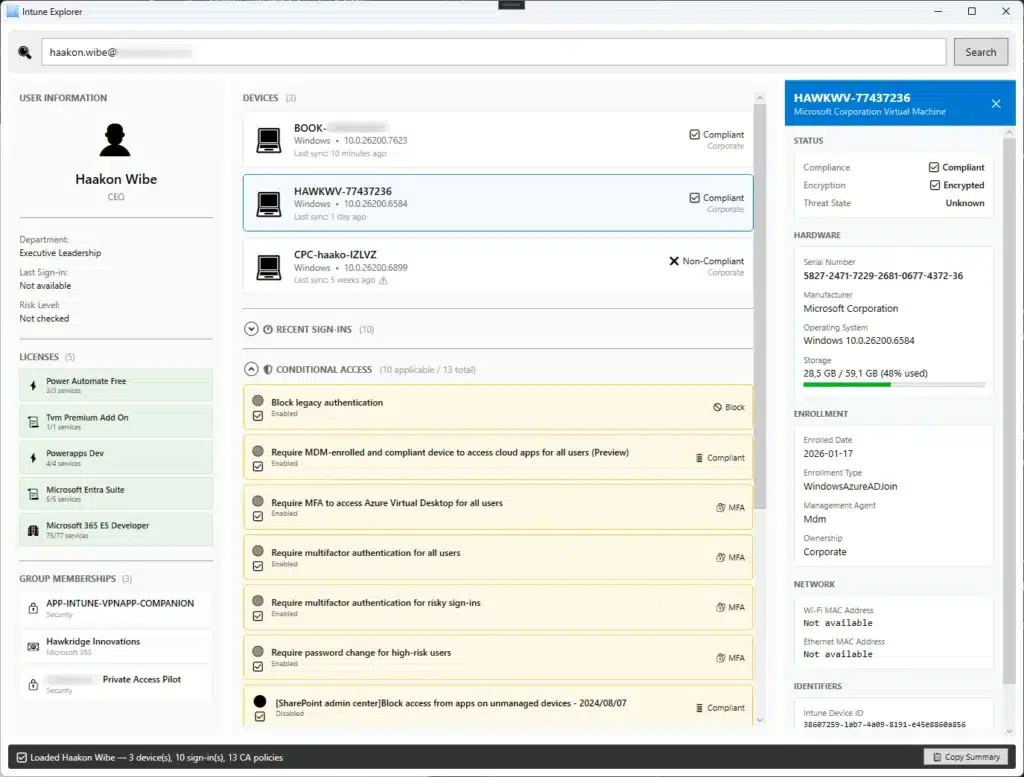
There were times when the AI produced code that worked perfectly and I had absolutely no idea why. Like this one:
var devices = await _graphClient.DeviceManagement.ManagedDevices
    .GetAsync(config =>
    {
        config.QueryParameters.Filter = $"userPrincipalName eq '{userPrincipalName}'";
    });

return devices?.Value?.ToList() ?? new List<ManagedDevice>();
Is that a lambda? A configuration delegate? Some kind of query builder pattern? I nodded wisely and moved on. The vibes were good. The devices appeared. Why mess it up with too many questions?
Or the new and proper error handling:
catch (ServiceException ex) when (ex.ResponseStatusCode == 404)
{
    // Handle not found
}
“When” in catch blocks? That’s genius. Or at least new to me. I seem to recall juggling if and else within try catch blocks, but that was then. Claude added it, tested it, and it worked great. Understanding can come later. Or never. Never is also fine.
Enter the MCP Filesystem Extension
Somewhere around here I remembered that I’d used the MCP Filesystem extension earlier for some other work. If I hooked that up to the source repos, maybe Claude could read and write code directly to all relevant files in the entire project.
That meant the workflow went from 16 steps to:
- Ask Claude Code to implement feature
- Claude Code reads the relevant files, understands the context, and writes the changes
- I review in Visual Studio Professional
- Build and test
And that’s it – the entire workflow. Well, in addition to that Claude’s memory knows what features we’ve discussed and built, and will pick up later where we left off.
The code quality improved a lot too, since Claude had full context instead of working from my incomplete pastes and descriptions.
Discovering what was possible
Because I work with Intune a fair bit, I could guide the project in directions that made sense – even if I couldn’t always implement them myself without help. I knew, for instance, that the Graph API exposes BitLocker recovery keys. Could we show that in the application? Because that can be a hassle in the Intune portal – sometimes you have to go through an archaic view in the Azure Portal too.
Turns out yes – and with surprisingly little code once you know what you’re doing. Or once the AI knows what it’s doing. Same thing, really.
var keyWithValue = await _graphClient.InformationProtection.Bitlocker.RecoveryKeys[keyInfo.Id]
    .GetAsync(config =>
    {
        // Only request the key property - this is required by the API
        config.QueryParameters.Select = new[] { "key" };
    });
I mean it just looks so elegant, so after we tested it and worked, I went back and just stared and tried to understand the fluent API pattern.
I almost wanna become a developer now – stuff like this is so much better to maintain (although it’s more characters than an old school “non-fluent” request) because if something gets added to the resource, it can be updated and discovered “naturally” with IntelliSense.
But instead of doing that, I added a comment to the Commit that said “Gets the recovery key” and called it a day.
Going Dark
At some point – it had to happen – I decided the application needed Dark Mode. Not because any users demanded it (I’m still the only one), but because Dark Mode feels more professional. More developer-y.
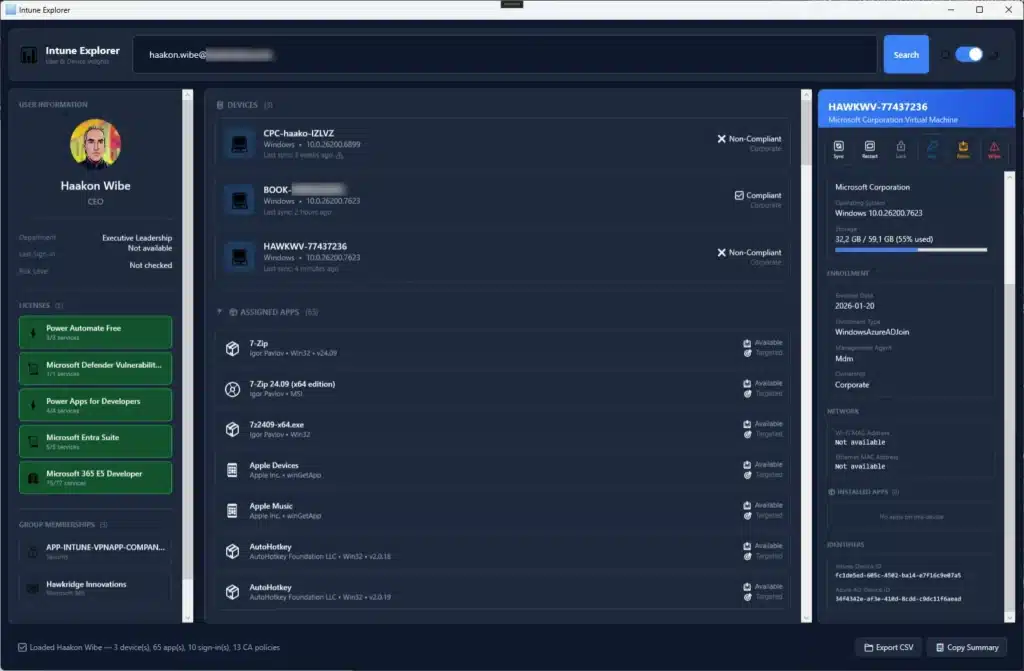
Also added “Export CSV” and “Copy Summary” buttons.
Learned a few things about the XAML framework here and there – very nice how it has this style inheritance and “dynamic resource references” which was just very smooth to read and for me to (almost) understand.
Did I just become a Supervisor?
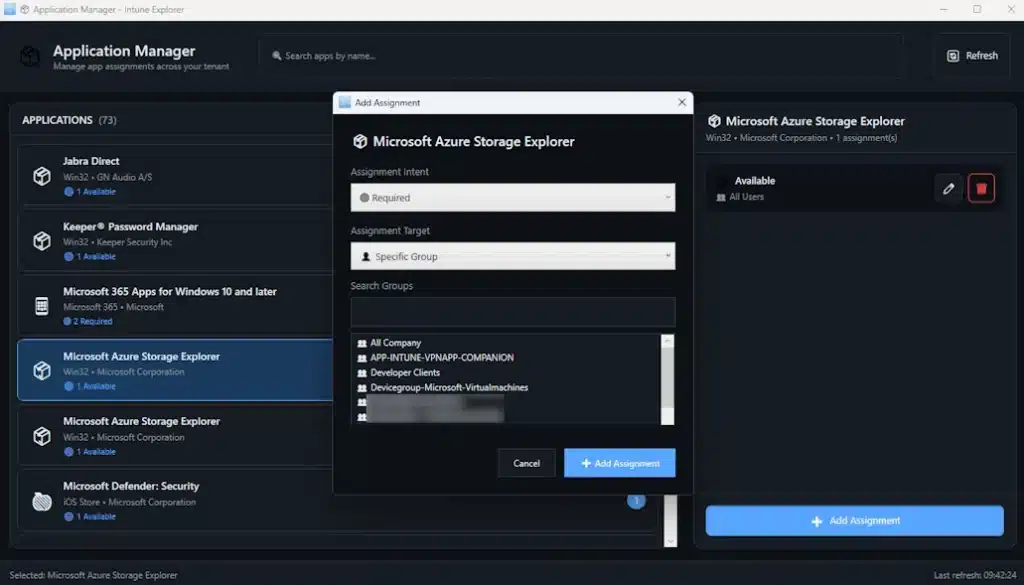
The roles were obvious for me from the start, but still – there was this specific moment when I realized what that really means. I was describing a feature – adding an Application Manager window for example – and instead of waiting for code to copy, I just … watched it unfold.
Claude Code reads all the files, the XAML, then the view model, then the related service classes. Then it made coordinated changes across all three files, maintaining consistency and following the patterns already established in the codebase.
“Am I still programming?… Or am I just … project managing an AI?”
The answer is probably somewhere in between, and I’ve decided not to think about too hard 😄
Claude capacity, limitations, and issues
I was on the Max 5x tier when I did this project, the number being the number of times more than the Pro plan when it comes to available capacity. You also get a lot more access to the top-level models in Code itself through the Max subscription, something which you don’t get as much on Pro – meaning that with Pro you mostly have to stay on Sonnet 4.5. Even though Claude opened up for Opus 4.5 on the Pro-tier last year.
That difference certainly pays off in a project like this, where the size has grown to ~8600 lines of C# code.
Claude’s guidelines themselves say that the Pro Plan with Sonnet 4.5 can handle “light work on small repositories”, which they think of being under or around 1000 lines of code.
It’s not easy to give an exact number for “lines of code” capacity when it comes to Max. You’re basically limited by the amount of tokens and the context window, as with all LLMs. For Claude, you’re basically looking at a window of around 200K tokens+, while Enterprise users through the API has access to 500K up to a million. You also have to plan for – or pay attention to – the rolling 5-hour windows, as well as the weekly and monthly caps on usage. They may also limit capacity depending on other factors.
On their blog they calculate that Sonnet 4 with a 1M token windows through the Anthropic API let’s you process over 75000 lines of code in a single request. But there’s a lot more to it. You could use techniques like prompt caching and batch processing to squeeze even more out of your message windows.
What they *do* say though, is that the Max plan is for power users or those with larger codebases. Some users have reported creating an iPhone app with 19000 lines of code in one go. So it all depends on what prompts you’re starting from, the context windows, your plans, and the rolling capacity to have an end result.
What Claude Code couldn’t do
It’s worth being honest about the limitations, partly for accuracy and partly so I don’t sound too much like an AI shill.
Like debugging the more complex issues. When something broke in subtle ways, I needed Visual Studio’s debugger. Claude Code might suggest what could be wrong, but actually stepping through the code and inspecting state was essential. This resulted in some more back and forth through screenshots etc., and sometimes I felt I had to roll back and address the feature in another way. Here it definitely helped to have done development work earlier, so I could decide which fundament to build on (i.e. don’t re-invent the wheel – use existing frameworks).
Understanding my specific context is also important. At the beginning, the AI wasn’t aware of features and configuration – not to mention specific quirks – of my setup. Context had to be provided repeatedly, and sometimes I forgot to provide it and got confused when suggestions didn’t work. MCP though helped significantly here. When I added roadmaps and development plans in the form of Markdown files, the load was reduced on memory also, and we were quickly up to speed again when switching chats.
Making design decisions also had to be *my* choice. What should the UI look like, and what’s the right user experience? Claude Code could implement it, but it couldn’t tell me what I should want. Although I would have listened if it had opinions,
Last but not least – knowing when to stop. The temptation to keep adding features is dangerous when implementation feels this easy. And it’s even more dangerous when MCP removes the copy-paste friction entirely. Scope discipline then was entirely on me, and I have questionable discipline…
The “It works, don’t touch it” architecture
Intune Explorer now has what I call a “carefully evolved” architecture. Some might call it “spaghetti code that somehow functions”. But I prefer my term.
There are parts of the codebase that is pretty good! Clean separation of concerns, proper error handling, thoughtful user experience, security around token handling, and extra guard rails around sensitive or “destructive” actions like Wipe or extracting BitLocker recovery keys.

So… lessons learned?
I know that this could have been done a lot better – using different agents and personas that code together and cross-check each others contributions during implementation, like a Security Architect agent that was in charge of its domain. And QA agents that would test all the various ways it could break – or make sure input was sanitized.
But either way you use it – vibe coding is real, and it kind of works. You can absolutely build functional software with AI assistance even if you don’t understand every line of code. Whether this is good or terrifying depends on your perspective. Possibly both.
Domain knowledge matters though. I knew what I could ask for, and could check and verify the basic due process for achieving whatever features we were working on. I don’t think I could have build a tool in a domain I didn’t understand. The AI can code, but it can’t know what you actually need.
Imposter syndrome though was a bit different. There’s a unique flavor to it I guess when your application works, but you’re not entirely sure why and you couldn’t recreate it on a piece of paper. So “I built this” feels both true and false simultaneously.
Ultimately – building things is still super-satisfying! There’s something really really enjoyable about seeing an application come together, regardless of how much AI assistance was involved. The dopamine doesn’t care about attribution I guess? 😄

Where we’re at
Intune Explorer now has move features than I originally imagined:
- User and device search with detailed information panels
- Recent Sign-ins and Conditional Access evaluations
- Application assignment management – device and / or user – with full CRUD operations
- Device actions with Sync, Restart, Retire, and Wipe
- BitLocker recovery key retrieval (with appropriate security warnings)
- Configuration Profiles, Compliance Policies, and Remediation with detailed statuses
- Autopilot & Enrollment manager with devices, profiles, ESPs, and Filters
- Dark mode / Light mode theming
- Export to CSV and quick summary for easy pasting
- Comprehensive debug logging (for when the vibes go bad)
Is it production-ready enterprise software? Absolutely not. Is it useful for my own work? Actually, yes. Is it proof that someone with rusty skills and AI assistance can build functional applications. Kind of!
Would I trust it with critical production data? Well, let’s not get carried away… 💪
What’s next
I’m still adding features when something seems interesting:
- Endpoint Security policies additions & improvements
- Update management – Quality, feature, drivers, and reporting
- Endpoint analytics, better reporting and monitoring
- Certificates (PKI) and connectors
- User interface improvements
- Collect diagnostics (ODC?)
- Remote assistance support
But there’s no deadline really, or any pressure. This remains an experiment for now – a way to keep learning and test the boundaries of what’s possible with AI assistance, and feel like a real developer from time to time.
The fact it produced a useful tool along the way is a happy accident. The fact that I now have opinions about WPF data binding is … also an accident. Less happy, more confusing.
Anyway – if you have tried vibe coding and ended up with something useful or something that technically runs but probably shouldn’t? Let me know!
