

Part 1 of this series covered the base architecture for Global Secure Access (GSA): the connector, enterprise apps, Private DNS, and Kerberos Cloud Trust. Following the initial configuration, access to on-premises file shares through the GSA tunnel completed without credential prompts, indicating a “successful deployment”.
However, follow-up checks revealed that Windows had silently fallen back to NTLM. Password Hash Sync masked the protocol failure, providing seamless access but bypassing the Kerberos infrastructure entirely.
Note: The examples in this documentation use the
dev.contoso.comlab from Part 1. Screenshots and logs reference a rebuilt instance of the lab with different domain names, but the underlying configuration and behavior remain identical.
The Impact of NTLM Fallback
Both Kerberos and NTLM produce identical user experiences through the GSA client (seamless access without prompts). However, NTLM does not support Conditional Access evaluation at the resource level and is actively on the deprecation path. For environments targeting a Zero Trust architecture, silent NTLM fallback needs to be caught and fixed.
Authentication protocols can be verified using the following methods:
- Client-side: Running
klistdemonstrates cached Kerberos tickets. If no tickets are present for the target resource after access, Kerberos wasn’t used. - Server-side: Event ID 4624 in the Security log indicates the authenticating protocol.
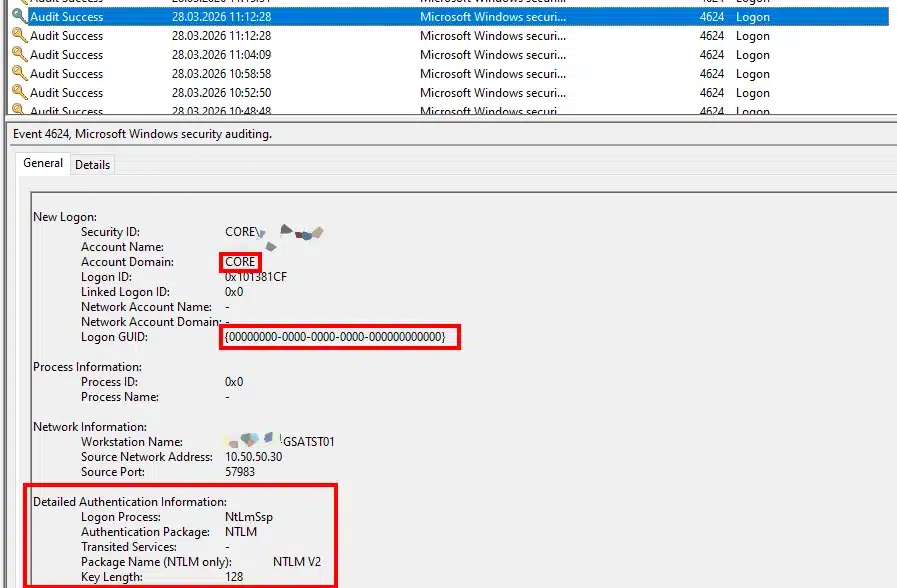
Event ID 4624 Comparison:
| Field | NTLM Fallback | Expected Kerberos |
| Authentication Package | NTLM | Kerberos |
| Package Name (NTLM only) | NTLM V2 | – |
| Logon GUID | {00000000-0000-0000-0000-000000000000} | {7e0d7fb4-...} (Populated) |
| Account Domain | DEV (NetBIOS) | DEV.CONTOSO.COM (FQDN) |
Diagnostic Note: The Source Network Address in Event 4624 reflects the IP of the GSA connector (e.g.,
10.50.50.30), not the origin Entra-joined device. The file server interprets the connector as the source of the traffic.
Diagnostic Pipeline
Initial diagnostics on the test device indicated that all prerequisites were met.
dsregcmd /status
# AzureAdJoined=YES, OnPremTgt=YES, CloudTgt=YES ✓

klist cloud_debug
# Cloud Primary (Hybrid logon) TGT available: 1 ✓

Get-DnsClientNrptPolicy
# .dev.contoso.com -> 6.6.255.254 ✓

Resolve-DnsName -Name _ldap._tcp.dc._msdcs.dev.contoso.com -Type SRV
# Returns CT-DC01.dev.contoso.com ✓

nltest /dsgetdc:dev.contoso.com /force
# Returns CT-DC01 with KDC and KEYLIST flags ✓

Test-NetConnection CT-DC01.dev.contoso.com -Port 88
# TcpTestSucceeded: True ✓
Despite passing validation (Cloud TGT available, NRPT rules active, DC locator returning the KEYLIST flag, and Port 88 reachable), accessing a file share by FQDN resulted in zero tickets and NTLM fallback.
Manually requesting a ticket (klist get krbtgt/DEV.CONTOSO.COM) successfully returned an AES-256 encrypted TGT from the domain controller. This confirmed the Kerberos infrastructure was functional; the failure was isolated to the automatic Windows SSO process.
Root Causes and Fixes
1. Missing Cloud Kerberos Ticket Retrieval Policy
Further review of the klist cloud_debug output revealed the underlying issue. While the Cloud TGT was present, the policy instructing Windows to utilize it was disabled.
Failing State (klist cloud_debug):
Cloud Kerberos enabled by policy: 0
SPN oracle configured:            0
KDC proxy present in cache:       0
Public Key Credential Present:    0
Cloud Referral TGT present in cache: 0
AS_REP Credential Type:           0
Cloud Primary (Hybrid logon) TGT available: 1
Resolution:
Deploy the required configuration via Intune or Group Policy.
- Intune Settings Catalog: Kerberos > Cloud Kerberos Ticket Retrieval Enabled (Enabled)
- Group Policy: Administrative Templates > System > Kerberos > Allow retrieving the Azure AD Kerberos Ticket Granting Ticket during logon (Enabled)
Registry Verification Note: Intune writes this policy to the MDM store (
HKLM\SOFTWARE\Microsoft\PolicyManager\current\device\Kerberos), not the traditional GPO path (HKLM\SYSTEM\CurrentControlSet\Control\Lsa\Kerberos\Parameters). Verifying the effective state viaklist cloud_debugis recommended over direct registry queries.
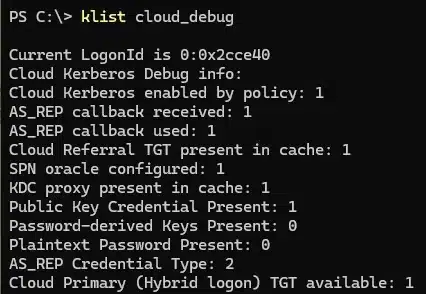
Expected State Post-Remediation:
Cloud Kerberos enabled by policy: 1
SPN oracle configured:            1
KDC proxy present in cache:       1
Public Key Credential Present:    1
Cloud Referral TGT present in cache: 1
AS_REP Credential Type:           2
Cloud Primary (Hybrid logon) TGT available: 1
2. Password Sign-in vs. Windows Hello for Business
Deploying the retrieval policy populated the Cloud TGT at logon, but resource access still resulted in NTLM fallback.
Cloud Kerberos Trust strictly requires a passwordless sign-in method (Windows Hello for Business PIN/biometric or a FIDO2 key). Automatic Cloud TGT exchange is not supported when authenticating with a traditional password.
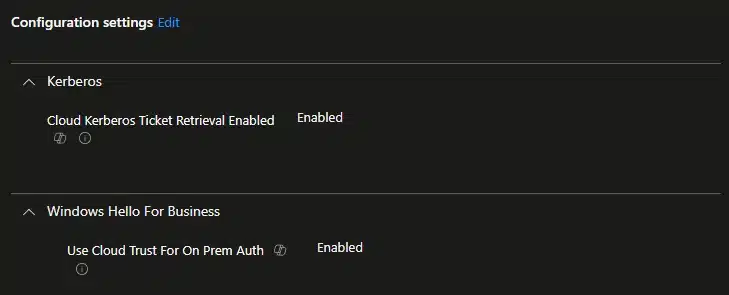
Switching to a PIN introduced a secondary failure. By default, Windows Hello attempts key-based authentication for on-premises resources. Because this lab utilizes Entra Cloud Sync (which lacks public key writeback support), the key trust authentication failed and reverted to NTLM.
Resolution:
Deploy a secondary policy to force the Cloud Kerberos Trust path:
- Intune Settings Catalog: Windows Hello for Business > Use Cloud Trust For On Prem Auth (Set to Enabled)
3. Hyper-V Enhanced Session Mode Hides PIN Credentials
During validation, the Windows Hello PIN option was missing from the sign-in screen.
The test device was a Hyper-V virtual machine connected via Enhanced Session Mode. Because Enhanced Session relies on the RDP protocol, the Windows Hello PIN credential provider is suppressed. To authenticate with a PIN and test Cloud Kerberos Trust, connect to the VM using Basic Session mode (View > Enhanced Session, unchecked).
4. Network Timing and Negative Kerberos Caching
Following a successful PIN sign-in, resource access prompted for credentials, and the GSA client state fluctuated between connected and disconnected.
During logon, Windows attempts to locate a domain controller to execute the Kerberos ticket exchange. If the GSA tunnel is not fully established at that exact moment, the DC location process fails. Windows caches this failure for 10 minutes (defined by the FarKdcTimeout registry value). Even after the GSA client establishes a connection, Windows relies on the negative cache and forces NTLM fallback.
Resolution:
Ensure the device has a stable network connection during logon. To bypass the timeout during testing, purge the cache manually once the GSA tunnel connects:
# Elevated execution required
klist purge_bind

# Standard execution
klist purge
Validation
After implementing the required policies, using a supported authentication method, and ensuring stable network connectivity, the SSO pipeline functions as designed.
klist will display three distinct tickets:
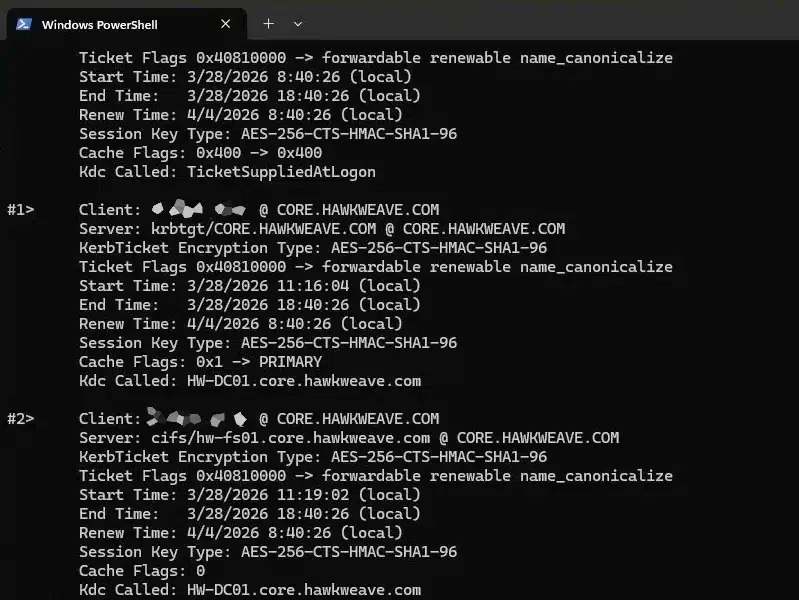
#0> Client: entra.user @ KERBEROS.MICROSOFTONLINE.COM
    Server: krbtgt/KERBEROS.MICROSOFTONLINE.COM @ KERBEROS.MICROSOFTONLINE.COM
    Kdc Called: TicketSuppliedAtLogon

#1> Client: entra.user @ DEV.CONTOSO.COM
    Server: krbtgt/DEV.CONTOSO.COM @ DEV.CONTOSO.COM
    KerbTicket Encryption Type: AES-256-CTS-HMAC-SHA1-96
    Kdc Called: CT-DC01.dev.contoso.com

#2> Client: entra.user @ DEV.CONTOSO.COM
    Server: cifs/CT-FS01.dev.contoso.com @ DEV.CONTOSO.COM
    KerbTicket Encryption Type: AES-256-CTS-HMAC-SHA1-96
    Kdc Called: CT-DC01.dev.contoso.com
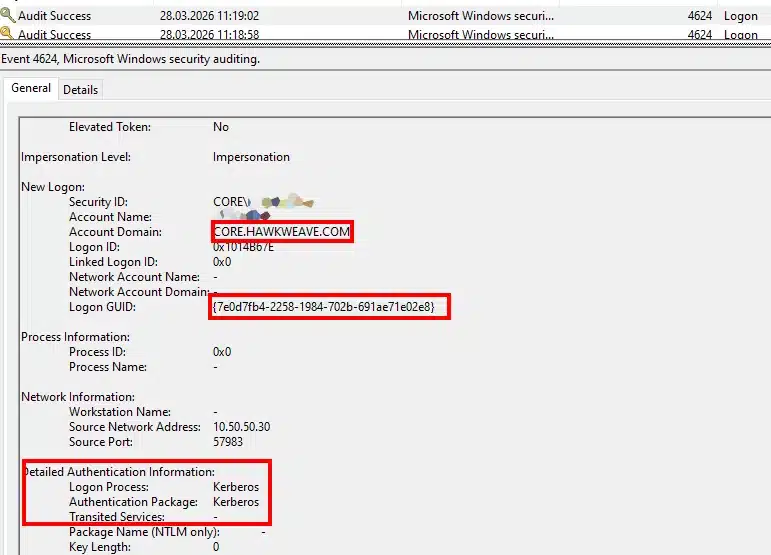
Event 4624 on the target server will confirm Kerberos as the authentication package, alongside the correct FQDN and Logon GUID.
Logon Process:          Kerberos
Authentication Package: Kerberos
Package Name (NTLM only): -
Logon GUID:             {7e0d7fb4-2258-1984-702b-691ae71e02e8}
Account Domain:         DEV.CONTOSO.COM
Additional Operational Considerations
- DNS Resolution Testing:
nslookupbypasses the Name Resolution Policy Table (NRPT) by default and won’t route queries through the GSA tunnel. Either useResolve-DnsName(which follows NRPT rules), or pointnslookupat the synthetic IP directly:nslookup CT-FS01.dev.contoso.com 6.6.255.254. - App Segment Configuration: IP-only app segments manage traffic routing but do not push NRPT rules. FQDN segments are required to trigger DNS interception, which is critical for DC locator services relying on SRV records.
- GSA Client Policy Refresh: App segment changes in the Entra portal don’t require a reboot. Open the GSA client, navigate to Troubleshooting, and click “Get policy” to pull the latest configuration.
- Orphaned App Segments: Deleting an enterprise app sends it to the Entra soft-delete recycle bin, retaining its claim on associated FQDN segments. Attempting to recreate the app with identical segments will fail until the original object is purged via
Remove-MgDirectoryDeletedItem. - Password Operations (Port 464): Ensure Port 464 (
kpasswd) is included in the Domain Controller app segment to allow users to process Active Directory password changes through the tunnel. - Certificate Revocation Lists: Enterprise CAs utilizing LDAP-based CDP/AIA entries will generate warnings in the certificate chain (
certutil -verify -urlfetch), as Entra-joined devices cannot perform LDAP queries. Transitioning to HTTP-based CDP/AIA entries is recommended for production environments.
Kerberos SSO Troubleshooting Playbook
Execute the following checks sequentially to isolate Kerberos failures over GSA:
# 1. Verify NRPT rules are present
Get-DnsClientNrptPolicy
# Expected: Internal domains route to 6.6.255.254

# 2. Verify internal DNS resolution via the tunnel
Resolve-DnsName -Name CT-DC01.dev.contoso.com

# 3. Verify DC locator functionality
nltest /dsgetdc:dev.contoso.com /force
# Expected: DC hostname returned with KDC and KEYLIST flags

# 4. Verify SRV record resolution
Resolve-DnsName -Name _ldap._tcp.dc._msdcs.dev.contoso.com -Type SRV

# 5. Validate Cloud Kerberos Trust policy state
klist cloud_debug
# Expected values:
#   Cloud Kerberos enabled by policy: 1
#   Cloud Referral TGT present in cache: 1
#   Cloud Primary (Hybrid logon) TGT available: 1

# 6. Verify device registration state
dsregcmd /status
# Expected values: AzureAdJoined=YES, OnPremTgt=YES, CloudTgt=YES

# 7. Validate Authentication Method
# Ensure sign-in was performed via WHfB PIN or FIDO2.
# Note: Basic Session mode is required to display the PIN provider in Hyper-V.

# 8. Check client ticket cache after FQDN resource access
dir \\CT-FS01.dev.contoso.com\ShareName
klist
# Expected: krbtgt and cifs/ service tickets are present.
# Zero tickets indicates NTLM fallback.

# 9. Verify Server-Side Authentication
# Check Event Viewer > Security > Event 4624 on the target server.
# Expected: Authentication Package = Kerberos.

# 10. Clear Negative Kerberos Cache (if all prerequisites pass but fallback persists)
klist purge_bind # Elevated execution
klist purge      # Standard execution

# 11. Validate Certificate Chain (if applicable)
certutil -verify -urlfetch C:\Temp\exported-cert.cer
# Verify HTTP CDP/AIA entries are reachable.